7 Vector Pattern Christmas Brushes
Holiday design deadlines have a way of creeping up faster than expected. Whether you are crafting social media graphics for a small business, designing seasonal packaging, or creating digital invitations for family gatherings, the pressure to produce high-quality visuals quickly is real. This is where 7 Vector Pattern Christmas Brushes become an indispensable asset in your creative toolkit. Rather than spending hours manually placing individual icons or struggling with complex repeat patterns, these brushes allow you to create intricate, festive borders and decorations with a single stroke.
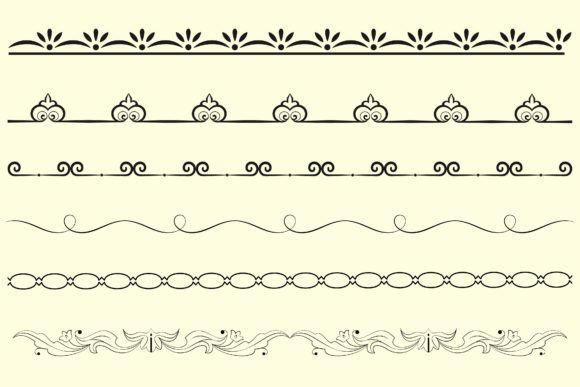
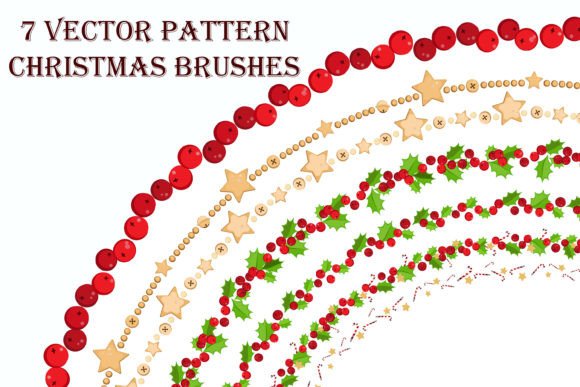
This collection includes beautiful brush patterns ranging from classic holly berries and winter leaves to whimsical stars and candies. The primary advantage here is versatility within simplicity. These brushes can be applied to any stroke in Adobe Illustrator, meaning you are not limited to rigid templates. You simply pick the style that best fits your project’s mood, draw a path, and apply the brush. The result is a professional-looking decorative element that scales perfectly without losing resolution, thanks to the vector nature of the files.
Understanding the Mechanics of Pattern Brushes
To get the most out of this collection, it helps to understand how pattern brushes function within Adobe Illustrator. Unlike standard art brushes that stretch a single image along a path, pattern brushes divide the artwork into five distinct tiles: side, start, end, inner corner, and outer corner. However, it is crucial to note that corner segments are not included in this specific set. This technical detail significantly influences how you should approach your design workflow.
Because corner tiles are absent, these brushes are optimized for curved paths, circles, and straight lines. If you attempt to apply them to a sharp-angled rectangle, the corners will remain empty or default to a standard miter join, which may disrupt the visual flow. Therefore, this collection is best suited for organic shapes. Think of wreaths, circular badges, flowing ribbons, or wavy dividers. By sticking to smooth curves and straight edges, you ensure that the berries, leaves, and candies maintain their integrity and spacing, creating a seamless and polished appearance.
Key Characteristics and Design Flexibility
The strength of the 7 Vector Pattern Christmas Brushes lies in their editability. Since they are native Illustrator brushes, you retain full control over the aesthetic properties after application. You are not stuck with a predefined look. Using standard Illustrator features, you can easily adjust the stroke weight to make the pattern more delicate or bold, depending on the hierarchy of your design. A thinner stroke might work beautifully for a subtle background texture, while a heavier stroke can serve as a primary frame for a holiday sale announcement.
Color customization is equally straightforward. Because the brushes are vector-based, you can recolor them instantly to match specific brand guidelines or personal preferences. If your client requires a monochromatic silver and white theme instead of traditional red and green, you can achieve this with a few clicks. This flexibility eliminates the need to create multiple versions of the same asset, streamlining your workflow and reducing file clutter.
- Variety of Motifs: The set includes seven distinct styles, covering essential holiday symbols like berries, foliage, celestial stars, and sweet treats.
- Scalability: As vector objects, the brushes remain crisp at any size, from small web icons to large-format print banners.
- Ease of Use: Installation is simple, and application requires only basic knowledge of the Stroke panel in Illustrator.
Practical Applications for Creators and Businesses
The utility of these brushes extends far beyond simple greeting cards. For marketers and entrepreneurs, time is money. Being able to rapidly prototype and finalize holiday-themed assets can give you a competitive edge during the busy Q4 season. Consider using the candy cane or star patterns to create eye-catching borders for email newsletters. These elements break up text-heavy layouts and add a festive touch that increases engagement without overwhelming the core message.
Educators and bloggers can also benefit significantly. When creating worksheets, lesson plans, or blog headers, these brushes provide a quick way to add visual interest. A teacher might use the leaf and berry brush to frame a winter-themed reading list, making the material more appealing to students. Similarly, a lifestyle blogger could use the star pattern to separate sections in a "Top 10 Holiday Gifts" post, enhancing readability and aesthetic appeal.
For product-based businesses, these brushes are ideal for packaging design. Imagine a simple kraft paper box adorned with a single, elegant stroke of the holly berry brush. It adds a premium, handcrafted feel to the unboxing experience. Because the brushes work well on curved paths, they are perfect for wrapping around cylindrical containers or labeling jars of homemade jams and cookies.
Workflow Tips for Best Results
To integrate 7 Vector Pattern Christmas Brushes effectively into your projects, keep a few practical considerations in mind. First, always expand your appearance if you need to edit individual elements of the pattern later. While keeping the brush live allows for easy adjustments to weight and color, expanding it converts the stroke into editable vector shapes. This is useful if you need to tweak the position of a specific leaf or remove a star that overlaps with text.
Second, pay attention to stroke alignment. Depending on the thickness of your path, you may want to align the stroke to the center, inside, or outside. For framing elements, an inside alignment often keeps the overall dimensions of your shape consistent, which is helpful when working within strict layout grids. Experiment with different alignments to see how they affect the density and spacing of the pattern.
Finally, remember that these brushes require Adobe Illustrator. They are not compatible with raster-based programs like Photoshop as live brushes, although you can copy and paste the resulting vector art into other applications if needed. Ensuring you have the correct software version installed will prevent any compatibility issues during installation.
Enhancing Productivity Without Sacrificing Quality
In a professional environment, efficiency does not have to come at the cost of creativity. These brushes bridge the gap between speed and quality. By handling the repetitive task of pattern creation, they free you to focus on higher-level design decisions, such as composition, typography, and color theory. The ability to generate complex decorative elements in seconds allows for more iteration and experimentation. You can try five different border styles in the time it would normally take to draw one manually.
Moreover, the consistent quality of vector graphics ensures that your work looks professional across all mediums. Whether viewed on a mobile screen or printed on high-gloss paper, the lines remain sharp and the colors vibrant. This reliability builds trust with your audience and clients, reinforcing your reputation as a detail-oriented professional.
In conclusion, the 7 Vector Pattern Christmas Brushes offer a smart, efficient solution for anyone looking to add festive flair to their designs. By understanding their strengths—particularly their suitability for curved and straight paths—and leveraging their editability, you can create stunning holiday visuals with minimal effort. Install the brushes, experiment with different strokes, and let these tools simplify your seasonal design workflow.