Streamlining Digital Design Workflows with Frame Procreate Brushes
In the evolving landscape of digital illustration and graphic design, efficiency is not merely a luxury; it is a fundamental component of professional sustainability. For creators ranging from freelance illustrators to small business owners marketing their products on social media, the time spent on repetitive structural elements can significantly detract from the core creative process. This is where specialized assets like Frame Procreate Brushes become essential tools in a modern designer’s toolkit. By integrating pre-designed framing elements into your workflow, you shift focus from manual construction to strategic composition, allowing for faster turnaround times without compromising aesthetic quality.
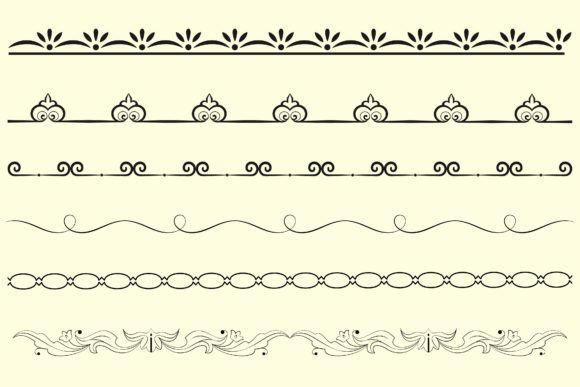
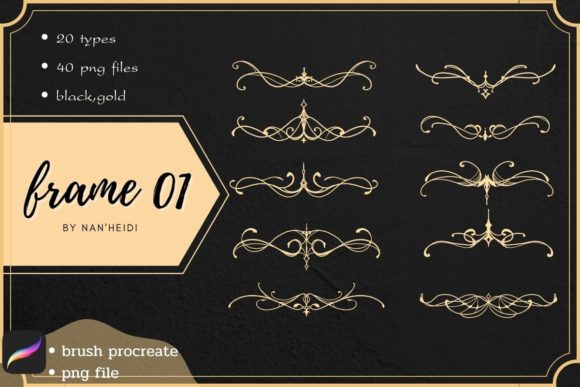
The specific package known as "frame 01" offers a curated solution for this common bottleneck. It includes twenty distinct brush heads and twenty decorative designs, totaling forty files in high-resolution PNG format. Additionally, it provides blank lines in both black and gold, offering versatility for various stylistic needs. Understanding how to effectively deploy these assets requires more than just downloading files; it demands a clear understanding of where they fit within the broader architecture of a creative project.
Integrating Frames into the Pre-Production Phase
Many designers mistakenly view frames as final touches, applied only after the primary artwork is complete. However, incorporating Frame Procreate Brushes during the pre-production or sketching phase can dramatically improve compositional balance. When you begin a project with a defined boundary, you create immediate constraints that guide your eye and hand. This is particularly useful for social media content creators who need to ensure text legibility and focal point clarity within square or vertical formats.
Using the twenty provided brush heads, you can quickly block out potential layouts. Instead of drawing perfect rectangles or intricate borders by hand—a process prone to inconsistency—you can stamp a frame element to serve as a placeholder. This allows you to experiment with negative space early in the process. For educators creating worksheets or bloggers designing featured images, this method ensures that the final output remains clean and organized. The availability of blank lines in black and gold further supports this planning stage, enabling you to map out text placement before committing to final typography.
Enhancing Efficiency During the Execution Stage
Once the conceptual framework is established, the execution phase benefits immensely from the technical specifications of the "frame 01" pack. The inclusion of forty PNG files means that these assets are ready to use across multiple platforms, not just within Procreate. While the brush heads are optimized for the iPad experience, the PNG formats ensure compatibility with desktop software such as Photoshop, Illustrator, or Canva. This cross-platform usability is crucial for professionals who often switch between devices depending on the task at hand.
The twenty decorative designs offer a range of styles that can be mixed and matched. Rather than relying on a single aesthetic, you can combine a minimalist black line frame with a more ornate gold corner element to create a custom look that aligns with brand guidelines. This modularity supports consistency across large projects. For instance, a small business owner launching a new product line can use the same base frame structure for all promotional materials, altering only the interior content. This approach reduces decision fatigue and maintains visual coherence, which is vital for brand recognition.
Moreover, the separation of brush heads and decorative designs allows for layered complexity. You can apply a simple border using a brush head and then overlay specific decorative elements from the PNG set only where needed. This selective application prevents the design from becoming cluttered, a common pitfall when using overly complex preset frames. By treating these elements as modular components, you retain creative control while benefiting from the speed of pre-made assets.
Quality Control and Post-Production Refinement
The final stage of any design workflow involves refinement and quality control. Here, the high resolution of the PNG files plays a critical role. Whether you are preparing files for print publication or high-density digital displays, the clarity of the black and gold lines ensures that edges remain crisp. Blurry or pixelated frames can undermine the perceived professionalism of an otherwise excellent piece of artwork. Therefore, verifying the scale and resolution of these assets against your final output dimensions is a necessary step.
When using the gold elements, attention must be paid to color accuracy across different screens. Gold is a challenging color to reproduce digitally, as it relies heavily on lighting effects and gradients. The provided gold lines in the "frame 01" pack are designed to simulate metallic sheen, but their appearance may vary depending on the background color. Testing these elements against both light and dark backgrounds during the post-production phase ensures that the intended effect is achieved. Adjusting opacity or blending modes can help integrate the gold elements more naturally into the overall composition, preventing them from looking flat or disconnected.
Additionally, organizing these assets within your digital library is key to long-term usability. Create dedicated folders for the brush heads and the PNG decorations. Tagging them with relevant keywords such as "border," "minimalist," or "luxury" can save significant time in future projects. For teams or agencies, establishing a shared asset library with these frames ensures that all members adhere to the same design standards, reducing the need for extensive revisions later in the process.
Practical Applications Across Industries
The versatility of Frame Procreate Brushes extends beyond traditional illustration. Consider the workflow of a digital marketer creating carousel posts for Instagram. Each slide requires a consistent visual container to hold text and images. Using the twenty brush heads, the marketer can quickly generate uniform frames for each slide, ensuring a cohesive narrative flow. The blank lines can then be used to separate headings from body text, improving readability and engagement.
For publishers and authors designing eBook covers or interior layouts, the decorative designs offer a way to add elegance without hiring a specialized typesetter. The black and gold options provide a classic, sophisticated look suitable for genres such as romance, history, or luxury lifestyle. By integrating these frames early in the layout process, authors can visualize the final product more accurately, making informed decisions about font choices and image placement.
Educators and course creators also benefit from these tools. When designing certificates, worksheets, or presentation slides, a well-defined frame adds structure and authority to the material. The ability to quickly swap between different decorative elements allows educators to tailor the aesthetic to the subject matter—using simpler lines for scientific content and more ornate designs for humanities or arts-related materials. This adaptability supports a more engaging learning experience without requiring advanced graphic design skills.
Maximizing Long-Term Value
To truly leverage the value of the "frame 01" pack, consider it as part of a broader system of assets. Combine these frames with complementary texture brushes, color palettes, and typography sets. Over time, you will develop a signature style that incorporates these framing elements seamlessly. Regularly review your usage patterns to identify which designs are most effective for your specific audience or client base. This data-driven approach allows you to refine your workflow continuously, focusing on the tools that deliver the highest return on investment in terms of time and quality.
Ultimately, the goal of using Frame Procreate Brushes is not to replace creativity but to remove friction. By handling the structural aspects of design with reliable, high-quality presets, you free up mental energy for the tasks that truly require human insight and innovation. Whether you are a hobbyist looking to polish your personal projects or a professional managing tight deadlines, integrating these tools into your routine offers a practical path to greater efficiency and consistent excellence.