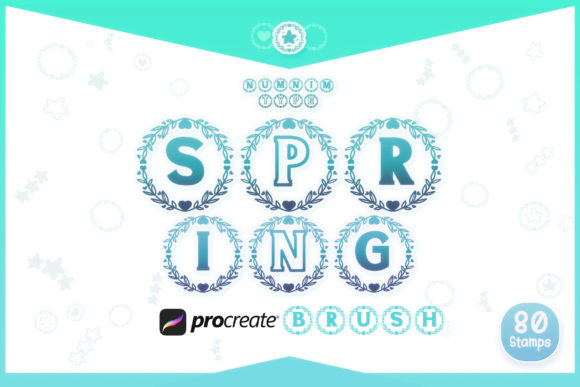
Transforming Digital Lettering with the Procreate Brush Spring Wreath Alphabet
Digital illustration has evolved from a niche hobby into a robust professional workflow for designers, planners, and social media creators. Within this ecosystem, Procreate stands out as the premier application for iPad users, offering an intuitive interface paired with powerful brush engines. However, even the most skilled artist can benefit from tools that streamline repetitive tasks while adding a touch of whimsical charm. This is where specialized assets like the Procreate Brush Spring Wreath Alphabet become indispensable. By combining the organic feel of hand-drawn botanicals with the efficiency of digital stamping, this toolset bridges the gap between custom lettering and rapid content creation.
The Appeal of Botanical Typography in Modern Design
Spring-themed aesthetics are not limited to the months of March through May. The imagery of fresh leaves, blooming flowers, and winding vines carries connotations of growth, renewal, and warmth. These elements are perennially popular in wedding invitations, baby shower announcements, lifestyle blogging graphics, and journaling spreads. Traditionally, creating a "wreath" style letter required significant time. An artist would need to sketch the letterform, then meticulously draw individual leaves and petals around the strokes, ensuring balance and visual harmony. This process could take hours for a single word.
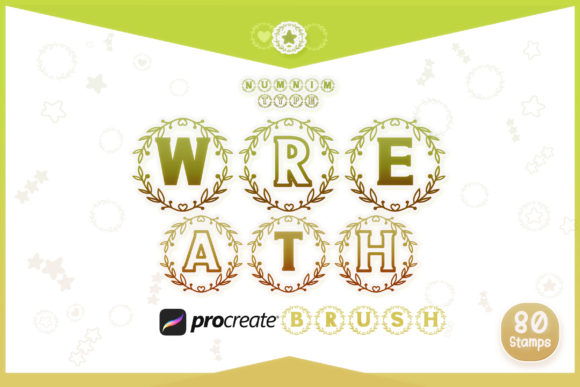
The Procreate Brush Spring Wreath Alphabet changes this dynamic entirely. It allows creators to achieve that intricate, hand-crafted look in seconds. Instead of drawing each leaf, you simply select the corresponding letter brush and tap the canvas. The result is a cohesive, beautifully styled character that looks as though it was illustrated by hand. This efficiency does not sacrifice quality; rather, it empowers artists to focus on composition, color theory, and layout, rather than getting bogged down in the minutiae of repetitive botanical details.
Understanding the Asset Structure and Versatility
To truly leverage this tool, it is essential to understand what is included in the package and how the different components interact. The set is delivered as a single zipped file containing a comprehensive Procreate brush set. It is designed specifically for use within the Procreate environment, ensuring compatibility and ease of installation. The collection is divided into distinct categories that offer flexibility for various design needs.
Dual Style Alphabets for Visual Variety
One of the standout features of this brush set is the inclusion of two distinct styles for the complete alphabet. Style 1 and Style 2 both cover letters A through Z, but they offer different visual weights and floral arrangements.
- Style 1 might feature a denser arrangement of leaves with a more structured vine pattern, ideal for bold headlines or focal points in a design.
- Style 2 could present a lighter, airier aesthetic with scattered blossoms, perfect for subtle watermarks or secondary text elements.
Having two styles allows for typographic hierarchy. For example, in a quote graphic, you might use Style 1 for the first letter of each sentence to create emphasis, while using Style 2 for the remaining text to maintain readability without overwhelming the viewer. This duality prevents designs from looking monotonous, a common pitfall when using single-style stamp brushes.
Numerals and Decorative Doodles
Beyond the alphabet, the set includes numbers 0 through 9, also available in two styles. This is particularly useful for creating dates on wedding invitations, pricing labels for small business owners, or page numbers in digital planners. The consistency between the letter and number styles ensures that your entire composition remains visually cohesive.
Additionally, the inclusion of extra doodles provides the finishing touches needed to fill negative space. These elements can be used to connect letters, frame quotes, or add decorative flourishes to corners of a page. When combined with the alphabetic stamps, these doodles allow for complete customization, enabling users to build complex wreath circles or borders that go beyond simple linear text.
Practical Applications Across Creative Industries
The utility of the Procreate Brush Spring Wreath Alphabet extends far beyond casual hobbyists. Several professional and semi-professional workflows can benefit significantly from integrating these brushes.
Digital Planning and Journaling
The community of digital planners is vast and constantly seeking ways to personalize their templates. Using standard fonts can often feel sterile or generic. By importing these brush stamps, planners can create custom headers for monthly spreads, habit trackers, or gratitude logs. The spring theme adds a cheerful, motivating vibe to daily organization. Because the brushes are scalable vector-like stamps, they retain clarity regardless of size, ensuring crisp edges on high-resolution iPad screens.
Social Media Content Creation
Influencers and small business owners rely on eye-catching graphics to stop the scroll. Instagram stories, Pinterest pins, and TikTok covers require quick turnaround times. With this brush set, a creator can type out a promotional message or a motivational quote in seconds. The unique aesthetic helps establish a recognizable brand identity. Instead of relying on overused system fonts, brands can develop a signature look using the specific floral patterns found in Style 1 or Style 2.
Wedding and Event Stationery
For freelance designers specializing in event stationery, time is money. While final print files often require vector software like Adobe Illustrator, the conceptualization and drafting phase can be done rapidly in Procreate. Designers can quickly mock up invitation suites, save-the-dates, and menu cards using the Procreate Brush Spring Wreath Alphabet. Once the client approves the layout and color palette, the designer can either recreate the final version in vector format or use the high-resolution exports from Procreate for digital-only invitations.
Technical Considerations and Best Practices
While stamp brushes are user-friendly, achieving professional results requires attention to detail. Here are some practical tips for maximizing the potential of this asset.
- Color Customization: Do not settle for the default black or green. One of the greatest advantages of digital brushes is the ability to change colors instantly. Experiment with pastel palettes for a soft spring look, or deep emeralds and golds for a more elegant, formal appearance. Use the color picker to sample hues from other elements in your artwork to ensure harmony.
- Layer Management: Each stamp creates a new layer or sits on the active layer depending on your settings. It is advisable to keep text on separate layers from background elements. This allows you to adjust the opacity, blend mode, or position of the letters independently. For instance, setting a wreath letter to "Multiply" can help it blend naturally with textured paper backgrounds.
- Spacing and Kerning: Unlike typed text, stamp brushes do not automatically adjust spacing. You must manually position each letter. Take time to adjust the kerning (space between characters) to ensure readability. Overlapping leaves can look natural, but overlapping the main stems of letters may reduce legibility. Use the transform tool to rotate slight variations in angle for a more organic, less robotic feel.
- Combining with Other Tools: These brushes work best when integrated into a broader workflow. Combine them with Procreate’s native text tool for body copy, or use them alongside hand-lettered words for a mixed-media effect. The doodles included in the set can be used to hide minor imperfections or connect disjointed elements.
Expanding Your Toolkit: Font and SVG Availability
For users who need to transition their designs from Procreate to other platforms, it is worth noting that the underlying design assets are available in other formats. The Numnim Type Store offers Font and SVG versions of these designs. This is crucial for professionals who need editable vector files for large-format printing or web development. The SVG format ensures infinite scalability without pixelation, while the font version allows for standard typing in software like Photoshop, Canva, or Microsoft Word. However, for the tactile, textured experience of digital painting on the iPad, the Procreate brush set remains the superior choice.
Final Thoughts on Enhancing Your Digital Workflow
The Procreate Brush Spring Wreath Alphabet is more than just a collection of pretty letters; it is a productivity tool that enhances creative expression. By removing the technical barrier of drawing complex botanical illustrations, it frees artists to explore composition and storytelling. Whether you are designing a wedding invitation, planning your week, or creating content for your growing online presence, these brushes offer a blend of elegance and efficiency. With two distinct alphabet styles, matching numerals, and versatile doodles, this set provides everything needed to bring a fresh, spring-inspired aesthetic to your digital projects. Embrace the convenience of stamp brushes without compromising on the artistic integrity of your work.