Unleashing Summer Vibes: A Deep Dive into Photoshop Tie Dye Brush Stamps
The digital design landscape is constantly evolving, yet certain aesthetics possess a timeless appeal that transcends seasonal trends. Among these, the psychedelic, fluid, and organic look of tie-dye remains a perennial favorite. For graphic designers, illustrators, and hobbyists alike, recreating this complex texture from scratch can be a time-consuming endeavor involving multiple layers, displacement maps, and intricate masking techniques. This is where Photoshop Tie Dye Brush Stamps revolutionize the workflow. By integrating these specialized tools into your creative arsenal, you bypass the tedious technical setup and jump straight into the artistic phase, allowing for rapid experimentation and high-impact visual results.
The Mechanics of Digital Tie-Dye
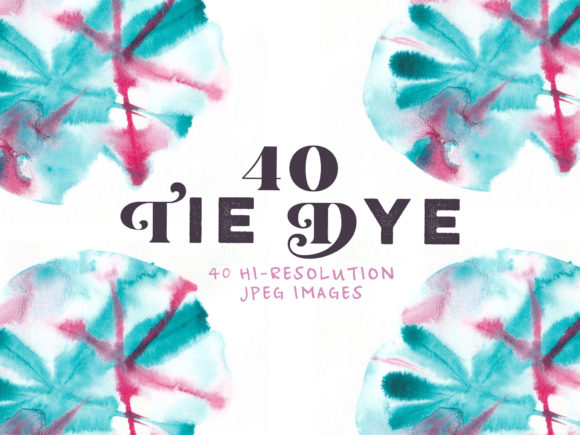
Understanding what makes these brush stamps effective requires a brief look at how they function within Adobe Photoshop. Unlike standard circular or square brushes, tie dye brush stamps are pre-configured with complex alpha channels and texture maps. When you click or drag these stamps onto your canvas, they do not merely apply a flat color. Instead, they deposit a nuanced pattern that mimics the crumpled, dyed fabric effect associated with traditional tie-dye methods.
The true power lies in their versatility. You are not locked into a single outcome. By adjusting the opacity, flow, and blending modes of the brush tool, you can manipulate how the stamp interacts with underlying layers. This flexibility allows designers to mix stamps and colors seamlessly. You might start with a bold, saturated cyan stamp and overlay it with a muted magenta, setting the top layer to "Multiply" or "Overlay" to create a rich, deep purple intersection that looks authentically hand-dyed. The ability to overlay layers is crucial here; it adds depth and realism that flat vector graphics often lack.
Adapting to Any Aesthetic: From Bold to Subtle
One common misconception about tie-dye is that it must always be loud, chaotic, and neon-bright. While the classic hippie aesthetic certainly embraces this energy, modern design applications often require a more refined approach. Photoshop Tie Dye Brush Stamps cater to both ends of this spectrum effortlessly.
For projects that demand attention—such as summer festival posters, streetwear branding, or energetic social media campaigns—you can go big, bold, and colorful. Select high-saturation hues like electric blue, hot pink, and lime green. Use large brush sizes to cover significant portions of the canvas, creating a dynamic background that screams summer vibe. The irregular edges and organic flow of the stamps ensure that even when used aggressively, the result feels natural rather than digitally manufactured.
Conversely, there is a growing trend toward "chilled" aesthetics in interior design, minimalist apparel, and wellness branding. In these contexts, the same brush stamps can be utilized to create subtle, muted patterns. By choosing pastel tones, earthy neutrals, or desaturated grays, and reducing the opacity of the brush, you achieve a watercolor-like effect. This super cool and chilled look retains the textural interest of tie-dye without overwhelming the viewer. It suggests comfort and relaxation, making it ideal for lifestyle blogs, spa marketing materials, or sophisticated packaging designs.
Streamlining the Design Workflow
Time is a critical resource in any creative project. Traditional methods of creating tie-dye effects often involve photographing actual fabric, scanning it, and then cleaning up the image in post-production. Alternatively, designers might spend hours manually painting swirls and using liquefy tools to distort shapes. Both methods are valid but inefficient for tight deadlines.
Integrating a set of Photoshop Tie Dye Brush Stamps into your library drastically reduces production time. What once took hours can now be achieved in minutes. This efficiency does not come at the cost of quality. Because the stamps are designed with high-resolution textures, they remain crisp even when scaled up for large-format printing. This speed allows designers to iterate quickly. You can test five different color palettes in the time it would previously take to create one. This rapid prototyping capability is invaluable when working with clients who need to see multiple concepts before making a decision.
Practical Applications Across Industries
The utility of these brush stamps extends far beyond simple digital art. Their adaptability makes them suitable for a wide range of commercial and personal projects. Consider the following scenarios where these tools shine:
- Merchandise Design: This is perhaps the most popular application. Whether you are designing t-shirts, hoodies, tote bags, or phone cases, tie-dye patterns add immediate visual interest. The stamps allow you to place specific patterns exactly where you want them on the garment mockup, ensuring the design aligns perfectly with seams and pockets.
- Web and UI Design: Background textures can make or break a user interface. A subtle tie-dye gradient created with these brushes can serve as an engaging hero section background for a website, adding personality without distracting from the content.
- Packaging and Branding: For brands targeting a youthful or eco-conscious demographic, organic textures convey authenticity. Using muted tie-dye stamps on product labels or box designs can differentiate a product on crowded shelves.
- Social Media Content: In the fast-paced world of Instagram and TikTok, standing out is essential. Creating unique story backgrounds or post templates with vibrant tie-dye elements can increase engagement and reinforce brand identity.
Techniques for Maximum Impact
To get the most out of your Photoshop Tie Dye Brush Stamps, consider adopting a few advanced techniques. First, do not rely solely on the default brush settings. Experiment with the "Scattering" and "Angle Jitter" options in the Brush Settings panel. This adds randomness to the placement and orientation of the stamps, preventing repetitive patterns and enhancing the organic feel.
Second, utilize layer masks. Instead of erasing parts of the tie-dye pattern you don't want, apply a layer mask and paint with black to hide specific areas. This non-destructive editing method allows you to refine the shape of the tie-dye blob, making it fit around text or other design elements precisely. You can also use gradient maps on adjustment layers to change the entire color scheme of your tie-dye composition instantly. This is particularly useful when you need to match a specific brand palette.
Third, combine the stamps with other texture overlays. Adding a slight noise grain or a paper texture over your tie-dye design can ground it in reality, making it look less like a digital effect and more like a physical print. This tactile quality is often what separates amateur designs from professional-grade work.
Choosing the Right Set for Your Needs
Not all brush sets are created equal. When selecting Photoshop Tie Dye Brush Stamps, look for high-resolution files (typically 2500 pixels or higher) to ensure scalability. Check if the set includes a variety of shapes—some resembling spiral ties, others looking like crumple dyes or sunbursts. Diversity in the stamp shapes provides more creative freedom. Additionally, read reviews or previews to ensure the brushes have smooth edges and proper transparency gradients. Poorly made brushes can result in jagged edges or harsh transitions that break the illusion of soft, dyed fabric.
It is also worth considering whether the set comes with preset color palettes or action scripts. Some premium bundles include automated actions that apply the brushes and adjust blending modes in one click, further speeding up the workflow. However, even a basic set of well-crafted stamps can yield professional results if you understand the principles of layering and color theory.
Embracing the Creative Freedom
Ultimately, the value of Photoshop Tie Dye Brush Stamps lies in the creative freedom they offer. They remove the technical barriers that often intimidate designers, allowing you to focus on composition, color harmony, and message. Whether you are aiming for a retro 70s revival, a modern minimalist aesthetic, or something entirely new, these tools provide the foundation.
The phrase "Happy summer no matter the time of year" encapsulates the spirit of this design element. Tie-dye evokes warmth, joy, and relaxation. By incorporating these vibrant, fluid patterns into your work, you inject a sense of playfulness and optimism. It invites the viewer to pause and appreciate the complexity of the colors blending together. So, whether you are designing for a major corporate client or a personal passion project, grab a set of these stamps. Experiment with overlapping layers, try unexpected color combinations, and let the organic nature of the brushes guide your hand. The result will be a unique, eye-catching design that captures the essence of creativity itself.