Broken Glass Single Procreate Brush
Digital art thrives on texture. While smooth gradients and clean lines have their place, there is a distinct energy in imperfection that brings illustrations to life. The Broken Glass Single Procreate Brush is designed specifically to introduce this element of controlled chaos into your workflow. It is not merely a tool for drawing shards; it is a versatile asset for adding depth, edge, and visual interest to lettering, character design, and abstract compositions.
For many creators, the difference between a flat digital image and a compelling piece of art lies in the details. This brush offers a streamlined way to incorporate complex textures without the need for manual painting or importing external overlays. By understanding how this specific tool functions within the Procreate ecosystem, artists of varying skill levels can determine if it aligns with their creative goals.
Understanding the Tool’s Functionality
At its core, this product is a single .brushset file tailored for the Procreate app. It requires version 5 or higher to function correctly, ensuring compatibility with modern iPad features such as pressure sensitivity and tilt support. Unlike comprehensive brush packs that may overwhelm users with hundreds of redundant options, this focused approach provides one highly specialized instrument.
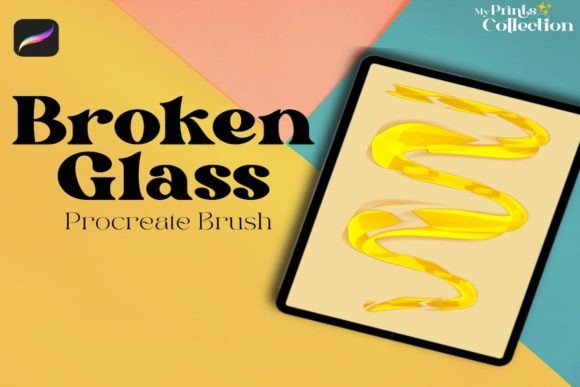
The brush simulates the irregular, sharp edges of fractured glass. Depending on your stroke speed and pressure, it can produce fine, hairline cracks or bold, jagged fragments. This variability makes it suitable for both subtle background textures and prominent foreground elements. Because it is built natively for Procreate, it integrates seamlessly with existing layer modes, allowing for immediate experimentation with blending options like Multiply, Screen, or Overlay.
Perspectives from Different Creators
The value of a specialized tool like the Broken Glass Single Procreate Brush varies significantly depending on who is holding the stylus. What serves as a quick fix for one professional might be a learning opportunity for another.
For Beginners and Hobbyists
If you are new to digital illustration, mastering texture manually can be daunting. Painting realistic glass fractures requires an understanding of light refraction, opacity, and sharp angles. This brush lowers the barrier to entry, allowing beginners to achieve professional-looking results quickly. It serves as an educational tool as well; by observing how the brush responds to pressure, novices can learn more about dynamic brush settings in Procreate. The primary priority here is ease of use and immediate visual reward.
For Professional Illustrators and Lettering Artists
Experienced artists often face tight deadlines. For a lettering artist working on a poster or album cover, adding a grunge or shattered effect manually could take hours. This brush reduces that time to minutes. Professionals evaluate tools based on reliability and speed. They need a brush that behaves predictably and integrates well into a complex layer stack. The Broken Glass Single Procreate Brush allows them to add edgy details to typography without disrupting their flow, making it a practical addition to a commercial toolkit.
For Small Business Owners and Entrepreneurs
Creators who sell digital products, prints, or merchandise often look for unique selling points. Using distinctive textures can help brand materials stand out in a saturated market. For a small business owner designing social media graphics or product packaging, this brush offers a cost-effective way to elevate production value. The focus here is on commercial value and versatility. Can this single tool enhance multiple types of projects? If it helps create eye-catching thumbnails or promotional banners, it pays for itself through improved engagement.
For Educators and Tutors
Digital art instructors constantly seek resources to demonstrate specific techniques. This brush can be used in tutorials to teach students about composition and contrast. By showing how a harsh texture interacts with soft colors, educators can explain visual hierarchy. The priority for this group is learning value. The tool must be simple enough to explain clearly but robust enough to demonstrate advanced concepts.
Practical Applications and Use Cases
To truly gauge whether this brush fits your needs, consider how it might apply to your current projects. Here are several scenarios where the Broken Glass Single Procreate Brush excels:
- Typography Effects: Apply the brush to the edges of bold letters to create a distressed, urban look. This is popular in streetwear design and music industry graphics.
- Character Details: Use subtle glass shards to indicate damage on armor, weapons, or magical effects in fantasy illustrations.
- Background Textures: Lower the opacity and scatter the brush strokes to create a gritty, noisy background that adds depth without distracting from the main subject.
- Abstract Art: Combine the brush with vibrant color palettes to create dynamic, fragmented compositions that explore themes of breaking and rebuilding.
Each application requires a different approach to pressure and size settings. Experimentation is key. A light touch might yield a delicate web of cracks, while a heavy hand creates bold, impactful shards.
Evaluating Fit and Compatibility
Before acquiring any digital asset, it is crucial to verify technical requirements. The Broken Glass Single Procreate Brush is exclusively compatible with the Procreate app on iPad. It is not compatible with Adobe Photoshop, Illustrator, or other desktop-based software. This limitation is important for users who work across multiple platforms. If your workflow relies heavily on desktop applications, this tool will not integrate into your process.
Additionally, ensure your Procreate app is updated to version 5 or higher. Older versions may not support the brush engine features used to create the dynamic texture of this tool. Checking your software version takes seconds but prevents frustration later.
Making an Informed Decision
Choosing the right digital brushes is about matching tools to intent. If you prioritize flexibility and want a single solution for adding sharp, organic textures, this brush is a strong candidate. It avoids the bloat of large packs, offering a focused utility that respects your storage space and organizational preferences.
Consider your current project pipeline. Are you working on designs that benefit from edgy, raw aesthetics? Do you need to speed up your texturing process? If the answer is yes, the Broken Glass Single Procreate Brush offers a practical, efficient solution. For those who prefer soft, painterly styles or work strictly in vector environments, this tool may not align with your immediate needs.
Ultimately, the best way to evaluate its potential is to test it within your own artistic context. Download the file, open a new canvas, and experiment with different blend modes. Observe how the texture interacts with your typical color choices. This hands-on approach provides the clearest insight into whether the brush enhances your unique creative voice.
By focusing on specific functionalities and real-world applications, you can move beyond generic marketing claims and assess the true utility of this digital asset. Whether you are refining a portfolio piece or designing a client deliverable, having the right texture tool can make the difference between good art and great art.