Master Detail with the Dots Single Procreate Brush
Digital illustration often suffers from a common pitfall: it can look too clean, too uniform, and ultimately, too sterile. When every line is perfectly smooth and every shape is mathematically precise, the artwork loses the organic warmth that draws viewers in. This is where texture and imperfection become your greatest allies. The Dots Single Procreate Brush addresses this need by offering a specialized tool designed to inject personality, rhythm, and tactile depth into your digital creations. It is not merely a stamp; it is a precision instrument for artists who understand that the smallest details often carry the most visual weight.
For professionals and hobbyists alike, the difference between a good piece and a great one frequently lies in the finishing touches. Whether you are working on hand-lettering projects, character illustrations, or complex pattern designs, adding consistent yet varied dot work can elevate the composition. This brush simplifies that process, allowing you to focus on creativity rather than fighting with software settings. By integrating the Dots Single Procreate Brush into your workflow, you gain a reliable method for adding fun and creative details that resonate with audiences looking for authenticity in digital art.
Enhancing Lettering with Strategic Texture
Hand-lettering and calligraphy have surged in popularity among marketers, bloggers, and small business owners because they convey a personal touch that standard fonts cannot replicate. However, digital lettering can sometimes feel flat. The Dots Single Procreate Brush serves as an excellent companion for typographic artists. Imagine creating a bold, serif headline for a wedding invitation or a social media graphic. By applying subtle dots along the serifs or using them to create a halftone effect within the letters, you add dimension without cluttering the design.
This approach is particularly effective for educators and content creators who need their text to stand out in crowded feeds. Instead of relying solely on color contrasts, you can use dot patterns to guide the viewer’s eye. For instance, a series of diminishing dots can lead attention from a headline to a call-to-action button. The brush allows for rapid application, meaning you can experiment with different densities and sizes in seconds. This efficiency is crucial for freelancers working under tight deadlines, enabling them to deliver polished, professional-looking assets without spending hours on manual detailing.
Elevating Illustrations with Organic Depth
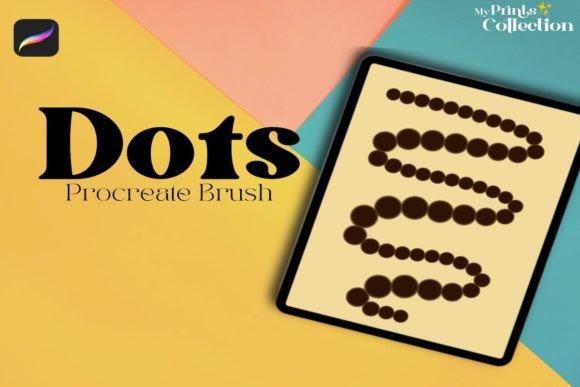
In character design and environmental illustration, texture helps ground fantastical elements in reality. A character’s clothing, the scales of a dragon, or the pores on a stylized face can all benefit from controlled dot work. The Dots Single Procreate Brush is engineered to provide consistency while maintaining an organic feel. Unlike generic circle stamps that look repetitive and mechanical, this brush offers a natural variation that mimics traditional media such as stippling pens or textured markers.
Consider a children’s book illustrator working on a whimsical forest scene. Using this brush to add texture to tree bark or the fur of a woodland creature adds a layer of sophistication. It breaks up large blocks of color, preventing the "coloring book" look that can plague amateur digital art. For publishers and authors self-publishing their work, this level of detail signals quality and care, potentially increasing reader engagement and perceived value. The brush supports various pressure sensitivities, allowing artists to control the opacity and size of each dot dynamically, which is essential for achieving nuanced shading and highlighting.
Streamlining Workflow for Digital Entrepreneurs
Time is a scarce resource for entrepreneurs, marketers, and small business owners who manage their own branding. Creating custom graphics for products, packaging, or online stores often requires a balance between speed and quality. The Dots Single Procreate Brush streamlines this process by eliminating the need to create custom shapes or adjust complex brush settings from scratch. With a single tap or stroke, you can generate intricate patterns that would otherwise take minutes to construct manually.
This efficiency extends to product mockups and presentation materials. If you are designing packaging for a handmade soap brand or a boutique coffee label, adding a dotted border or a textured background can enhance the premium feel of the product. The brush allows for quick iteration, meaning you can test multiple design variations during a client meeting or brainstorming session. This agility supports better decision-making and helps professionals present more polished concepts earlier in the design process. By reducing technical friction, the tool empowers users to focus on strategic design choices rather than operational hurdles.
Technical Compatibility and Practical Considerations
Before integrating any new tool into your artistic arsenal, it is vital to understand its technical requirements and limitations. The Dots Single Procreate Brush is distributed as a .brushset file, which is specifically formatted for the Procreate app. To use this brush effectively, you must have Procreate App version 5 or higher installed on your iPad. This requirement ensures that the brush leverages the latest rendering engines and pressure sensitivity algorithms available in the software, providing the smoothest and most responsive experience.
It is important to note that this brush is not compatible with Photoshop or Illustrator. This limitation is significant for users who rely heavily on Adobe’s ecosystem for vector-based work or desktop-centric workflows. If your primary output requires scalable vectors for large-format printing, you may need to recreate similar effects using Illustrator’s symbol sprayer or pattern brushes. However, for raster-based digital painting, social media content, and screen-focused illustrations, Procreate remains the industry standard for mobile creativity, and this brush is optimized specifically for that environment.
Additionally, users should watch the video included in the listing to fully understand the brush’s behavior. Video demonstrations often reveal nuances such as optimal pressure curves, recommended canvas resolutions, and blending modes that static descriptions cannot convey. Taking the time to review these resources ensures that you extract maximum value from the tool. For those new to Procreate, this also serves as a mini-tutorial on how specialized brushes interact with the app’s unique gesture controls and layer systems.
Who Benefits Most from This Tool?
The Dots Single Procreate Brush is versatile, but it offers distinct advantages to specific groups. Hobbyists will appreciate the ease of use, allowing them to achieve professional-looking results without a steep learning curve. Freelance illustrators will find it invaluable for adding signature textures that differentiate their style in a competitive market. Educators teaching digital art can use it to demonstrate principles of texture, value, and composition efficiently. Meanwhile, marketers and bloggers can utilize it to create eye-catching visuals that break the monotony of stock photography.
Ultimately, this tool is for anyone who values precision and personality in their digital work. It bridges the gap between technical capability and artistic expression, providing a simple yet powerful way to enhance visual communication. By understanding its specific applications and technical constraints, users can make informed decisions about whether it fits their current workflow. For those committed to creating engaging, textured, and detailed digital art within the Procreate ecosystem, the Dots Single Procreate Brush represents a practical investment in their creative toolkit.