Ugly Sweater Pattern Brushes
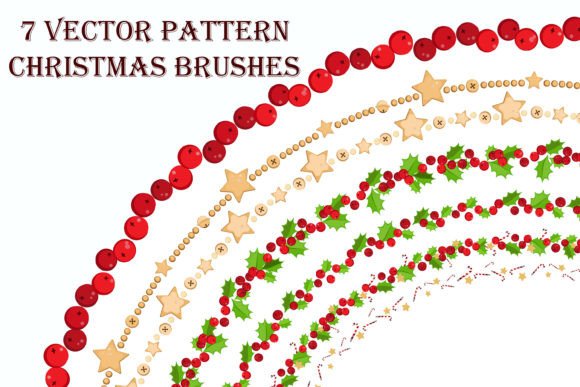
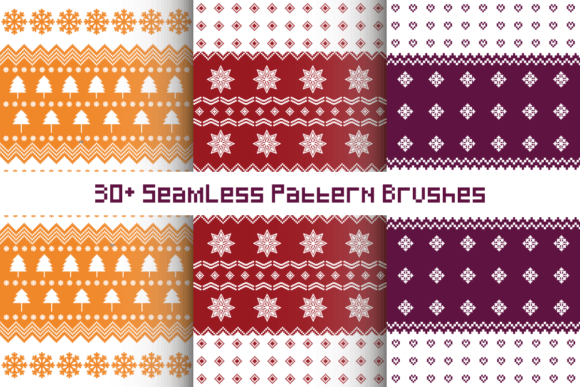
Designing festive holiday graphics often involves a tedious balance between creativity and technical execution. For many illustrators and graphic designers, the most time-consuming aspect of creating "ugly sweater" themed artwork is not the concept, but the repetitive manual drawing of knitted textures, snowflakes, and geometric motifs. This is where specialized tools become essential. Ugly Sweater Pattern Brushes offer a streamlined solution for Adobe Illustrator users, transforming complex decorative elements into simple, editable strokes. By leveraging these assets, creators can shift their focus from manual labor to artistic composition, ensuring high-quality output without the burnout associated with repetitive vector drawing.
Streamlining the Creative Workflow
The primary value of this toolset lies in its ability to simplify the creation of seamless patterns. Traditional methods require drawing each element individually, aligning them perfectly, and grouping them manually. With Ugly Sweater Pattern Brushes, the process is reduced to drawing a single path. Whether you are creating a border for a holiday card or filling an entire sweater silhouette, you simply apply the brush to the stroke. This immediate application saves hours of work, allowing professionals to meet tight deadlines during the busy holiday season.
Furthermore, the scalability of vector brushes ensures that your designs remain crisp at any size. You can adjust the thickness of the stroke to increase or decrease the scale of the pattern instantly. This flexibility is crucial when adapting designs for different mediums, such as large-format banners versus small social media icons. Instead of redrawing elements for each format, you adjust one parameter, and the entire pattern recalibrates automatically.
Customization and Color Control
One of the most significant advantages of using vector-based pattern brushes is the ease of customization. Unlike raster images or pre-made PNG overlays, these brushes are fully editable within Adobe Illustrator. You can change the color of the stroke to instantly alter the appearance of the pattern brush. This feature allows for rapid experimentation with color palettes. For instance, a designer can test a traditional red-and-green scheme against a modern pastel or monochrome look in seconds.
This level of control supports brand consistency for businesses. Marketing teams can adapt festive designs to match corporate color guidelines without losing the intricate details of the knit patterns. The ability to modify colors non-destructively means that you can maintain a library of templates and update them yearly with fresh color trends without starting from scratch.
Organization and File Management
Managing large sets of design assets can often become chaotic, leading to wasted time searching for specific elements. This particular set addresses that issue by providing a structured file system. You will receive six separate AI files, with each group of brushes organized in its own file. This separation prevents software lag that can occur when loading too many brushes simultaneously and makes it easier to locate specific styles, such as fair isle patterns, snowflakes, or cable knits.
For freelancers and agencies working on multiple client projects, this organization facilitates better workflow management. You can open only the relevant file for the current task, keeping your workspace clean and efficient. It also simplifies collaboration, as team members can easily share specific brush groups without transferring unnecessary data.
Practical Applications for Various Creators
The utility of Ugly Sweater Pattern Brushes extends beyond just creating literal sweater illustrations. Here are several practical use cases where these tools add significant value:
- Holiday Marketing Campaigns: Small business owners and marketers can create eye-catching social media posts, email headers, and digital ads quickly. The unique textures add a festive feel that stands out in crowded feeds.
- Print-on-Demand Products: Entrepreneurs selling custom merchandise can use these brushes to design unique patterns for phone cases, notebooks, and wrapping paper. The seamless nature of the vectors ensures high-quality printing results.
- Educational Resources: Educators and publishers creating holiday-themed worksheets or activity books can use these brushes to add engaging borders and decorative elements that appeal to students.
- Web Design Elements: Web developers and UI designers can incorporate these patterns into seasonal website updates, creating festive dividers, background textures, or button styles that enhance user experience during the holidays.
Technical Considerations and Best Practices
While these brushes are powerful, it is important to understand their limitations and best use cases. They are designed specifically for Adobe Illustrator, meaning they are not compatible with other vector software like CorelDRAW or Affinity Designer without conversion. Users must have access to Adobe Illustrator to utilize the native brush functionality effectively.
Additionally, while the brushes are scalable, extremely complex patterns may impact performance if applied to very long paths with excessive anchor points. It is recommended to keep paths clean and simplify anchor points where possible. When scaling down significantly, ensure that the stroke weight does not become so thin that details are lost in print or on low-resolution screens.
Another consideration is the style fit. These brushes are tailored for the "ugly sweater" aesthetic, which features bold, chunky, and often whimsical patterns. They may not be suitable for projects requiring subtle, realistic knit textures or minimalist design approaches. Always evaluate whether the bold nature of these patterns aligns with your overall design goal.
Enhancing Professional Presentation
Using high-quality, consistent patterns elevates the perceived value of your work. Clients and audiences associate detailed, well-executed textures with professionalism and effort. By using Ugly Sweater Pattern Brushes, you ensure that every curve and corner of your design maintains uniformity. This consistency is difficult to achieve manually, especially under time pressure.
Moreover, the ability to quickly generate variations allows you to present multiple concepts to clients. Instead of showing one static design, you can offer three or four color and pattern variations in the same amount of time it would normally take to create one. This responsiveness can strengthen client relationships and increase the likelihood of project approval.
Final Thoughts on Efficiency and Creativity
In the fast-paced world of digital design, tools that bridge the gap between technical precision and creative freedom are invaluable. Ugly Sweater Pattern Brushes provide a practical solution for anyone looking to produce high-quality holiday graphics efficiently. By reducing the manual workload and offering extensive customization options, these brushes empower creators to focus on what matters most: telling a compelling visual story.
Whether you are a seasoned illustrator looking to speed up your workflow or a small business owner aiming to create professional-grade marketing materials, integrating these vector tools into your process can yield significant benefits. The key is to leverage the simplicity of the stroke-based application while exploiting the depth of color and scale adjustments available. With six organized AI files at your disposal, you have a versatile resource ready to tackle any festive design challenge.